Thermal Drone Imaging: Distance to Target DOES Make a Difference

“It’s a thermal camera. Won’t it pick that up regardless of how far away it is?”
Not necessarily. Thermal Drone Imaging has several considerations.

Thermal cameras have resolution limits. The distance between the camera and the target affects how much detail the camera can capture—and whether a small thermal anomaly stands out, blends into its surroundings, or goes unnoticed.
A higher-resolution camera can help, but distance, lens selection, and target size still matter.
For many thermal scans, the goal is not a precise temperature measurement. It is a clear, useful image that reveals thermal patterns and areas that warrant closer attention. The priority is image quality, not simply how much area the drone can cover.
A thermal image is still made of pixels
Thermal drone imaging creates something called a raster image: a grid of pixels representing the scene.
For a given camera and lens, moving farther from a surface increases the physical area represented by each pixel. The image may cover more of a roof, façade, or search area, but each small feature is represented by fewer pixels.
Consider a simplified example. If each pixel represents an area approximately one inch across at one distance, doubling that distance makes the area approximately two inches across—four times the surface area per pixel.
The camera has not gained more pixels. Those pixels are simply covering more ground.
That is the tradeoff: more coverage does not necessarily mean more useful detail.
Small anomalies can blend into the background
A pixel does not necessarily represent one isolated object or one uniform surface. A small hot or cold feature may occupy only part of the area contributing to that pixel’s signal. The surrounding surface contributes too, potentially making the feature appear less pronounced than it actually is.
A strong thermal contrast may still produce a visible indication, even when the feature occupies less than one pixel. But a smaller or lower-contrast anomaly may become difficult to distinguish—or may be missed altogether.
The question is not simply, “Did the camera capture an image?”
It is, “Did the camera capture enough detail to reveal what we were looking for?”
Enlarging the image does not capture more detail
The word “zoom” can create confusion.
Many drone thermal cameras use digital zoom. Rather than changing the optics to capture a more detailed view of the target, digital zoom crops and enlarges part of the existing thermal image.
The target looks larger on the screen, but it is not represented by more independently captured thermal pixels.
That enlargement can help an operator examine what is already visible. It does not recover a small anomaly that was not adequately resolved in the original capture.
Some thermal systems offer different focal-length cameras or optical zoom, so it is important to understand what a particular system is actually doing. An advertised zoom level alone does not tell you how much additional thermal detail is being captured.
The controller view and saved image are not necessarily the same
An enlarged view on the controller should not automatically be treated as a preview of the saved thermal image.
Depending on the system and capture settings, the saved file may retain the full thermal frame rather than the enlarged view displayed during flight. Other capture modes may save a cropped or processed image.
Either way, a larger-looking target does not prove that more thermal detail was recorded. Operators need to understand both what the controller displays and what the camera actually saves.
Why this matters for searches and building scans
For law enforcement, first responders, or search operations, detecting a thermal indication is not the same as resolving enough detail to determine what produced it. A small indication may be visible without providing enough information to confidently interpret it.
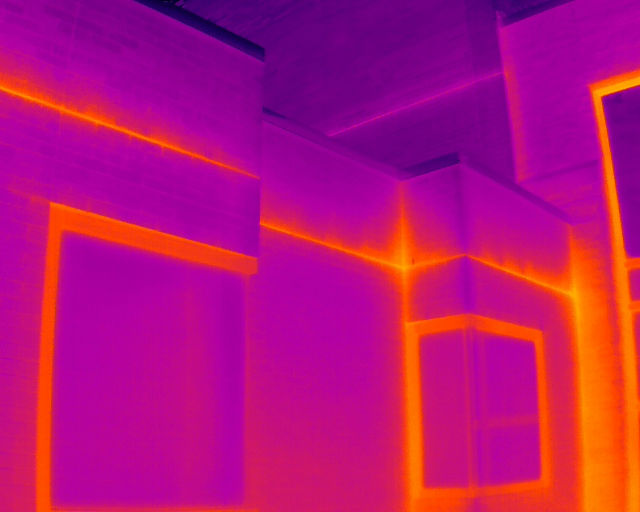
For roof and façade scans, the same resolution limits apply to small thermal patterns. A flight distance that adequately captures a large pattern may not adequately capture a much smaller one.
The appropriate distance depends on the smallest feature the scan needs to reveal—not simply whether the entire building fits into the image.
In both applications, covering the area is not the same as capturing the detail needed to evaluate it.

Visual quality matters—even without temperature measurements
Resolution matters whether or not anyone intends to report a temperature.
If the purpose of the scan is to identify unusual thermal patterns, those patterns still need to be distinguishable from their surroundings. Distance affects whether the camera provides enough detail to make that distinction.
When dependable temperature measurements are required, additional considerations apply. A visible indication alone does not establish that the target is adequately resolved for an accurate reading.
But the first concern remains straightforward: can we see the feature clearly enough to recognize that it deserves attention?
Plan for the detail the task requires
There is no single flight distance that is right for every thermal assignment. Camera resolution, lens field of view, target size, thermal contrast, and environmental conditions all influence the result.
The useful question is:
“What is the smallest target or anomaly we need to detect, and will this camera and lens resolve it at the planned distance?”
A quality thermal scan is not defined by how much area fits into the image—or how large the image looks on the controller. It is defined by whether the captured image provides the detail needed for the task.
Distance to target DOES make a difference.
NEXT STEP
Make Sure Your Thermal Scan Captures What Matters
Planning a roof or façade scan, or another thermal imaging project? Start with the details you need to see—not just the area you need to cover.
Contact ScenePhoto360 to discuss your project and an imaging approach focused on clarity, useful detail, and your specific goals. Check out the Thermal Information Page
MEET THE AUTHOR

Earl Bakke is a Level II Certified Thermographer and FAA Part 107 pilot with night-operations authorization. Twenty years in law enforcement and crash reconstruction, 450+ crash scene, building, home and thermal inspections, and testimony in criminal and civil proceedings. He founded ScenePhoto360 in Stillwater, Minnesota. Read the full background.